


How Model Context Protocol can automate the integration for AI applications (and save you hours of coding)
For every external tool you want to connect to your AI system, you have to build a custom integration. This comes with two major downsides. One: it takes up a lot of your time. Two: you can not scale this way of working. Luckily, the Model Context Protocol (MCP) can solve this. In this article, we explain how MCP works, what happens on the server side, and talk about security.
Imagine you want to develop an appointment scheduling application for a medical practice. Your goal is to make an AI assistant to handle appointment scheduling from email.
Now, let’s think of one of the requests that assistance could receive.
A patient named Sarah writes: "Hi, I need to move my Tuesday 2pm appointment to Thursday same time."
Let’s have a look at the different steps needed to complete this request.
The workflow
Here's what happens:
- Your AI reads the email.
- It checks the doctor's schedule and sees Thursday 2pm is available.
- The AI-assistant asks the approval of the medical receptionist: "Should I reschedule Sarah's appointment from Tuesday, 2pm to Thursday, 2pm?"
- After approval, the system updates the calendar.
- Finally, the AI sends an email to the patient, confirming the new appointment.
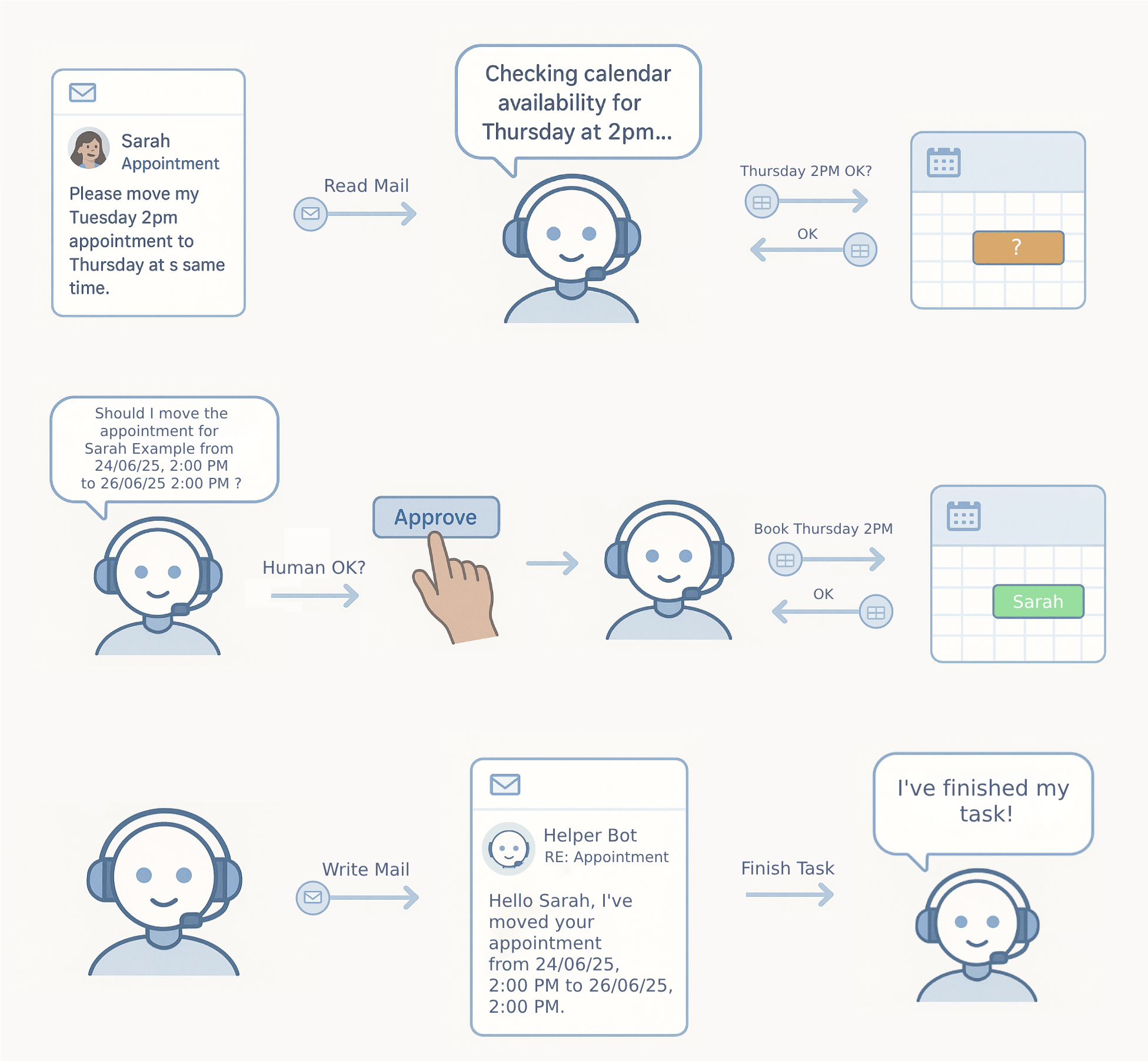
The different steps of rebooking an appointment.
This workflow requires your AI to:
- read emails,
- access calendar data,
- modify appointments,
- send out emails.
Each of these tasks is linked to different systems with different APIs.
The integration problem: a scaling and maintenance nightmare
Until recently, connecting AI systems to external tools meant building custom integrations for every possible combination. An approach that can’t be scaled.
Why not?
Because today's landscape is a classic scaling nightmare. AI systems like Claude, GPT-4, and Gemini need to connect with thousands of different tool databases, APIs, file systems, cloud services, your cousin's custom inventory system… you name it.
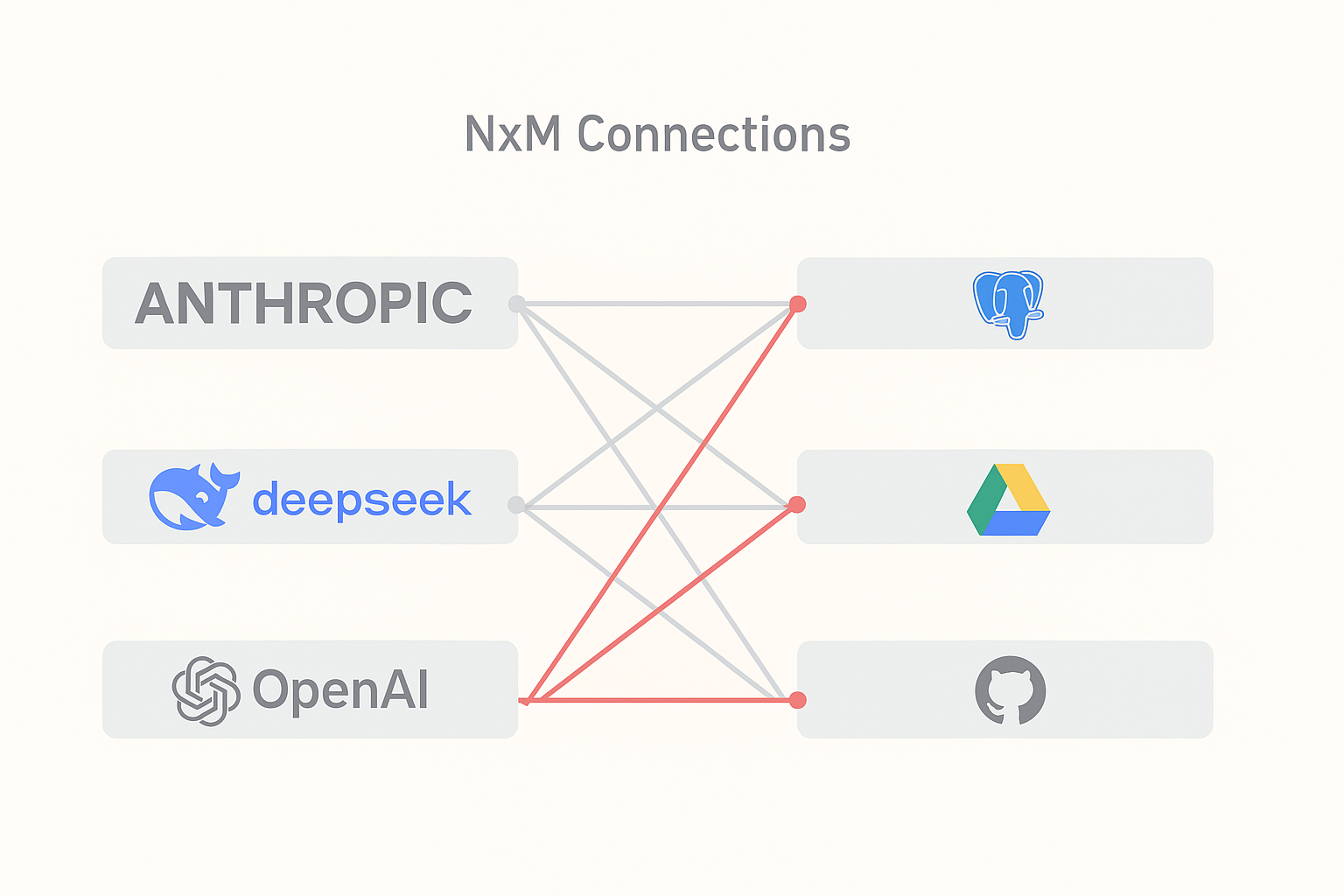
For every task you want your AI application to perform, you need to set up a custom integration.
Without a standard protocol, every AI system requires custom code to talk to all those different tools. Want Claude to read Google Drive files? That's one integration. Want it to also check Slack messages? That's another completely separate integration.
Multiply this across dozens of tasks and hundreds of tools, and you're looking at maintaining thousands of individual connections.
This N×M scaling problem is also a maintenance nightmare. Because each integration needs
- separate documentation,
- authentication handling,
- error management,
- ongoing maintenance, as APIs inevitably change.
We’ve seen teams spend more time maintaining integrations than building actual features.
Solving the integration mess: the Model Context Protocol
The Model Context Protocol (MCP) changes this. It provides a standardized way for AI systems to communicate with external tools and services. MCP tackles the integration mess by creating a universal communication layer.
How does MCP work?
MCP introduces a standardized communication layer between AI systems (clients) and external tools (servers). Instead of building N×M integrations, you build N+M: each AI system implements MCP once, and each tool exposes an MCP interface once.
The math alone should make you happy.
The protocol uses JSON-RPC 2.0 for message formatting, which provides structured request-response communication. If you've worked with APIs before, this will feel familiar:
Model Context Protocol supports two transport mechanisms:
- stdio for local development (where the client launches the server as a subprocess)
- HTTP with Server-Sent Events (SSE) for remote deployments.
If you want to get a hang of writing and interacting with MCP servers, start with stdio - it's simpler to debug.
What servers actually expose
Model Context Protocol servers expose three types of functionalities. Understanding the distinction matters for how you design your integrations.
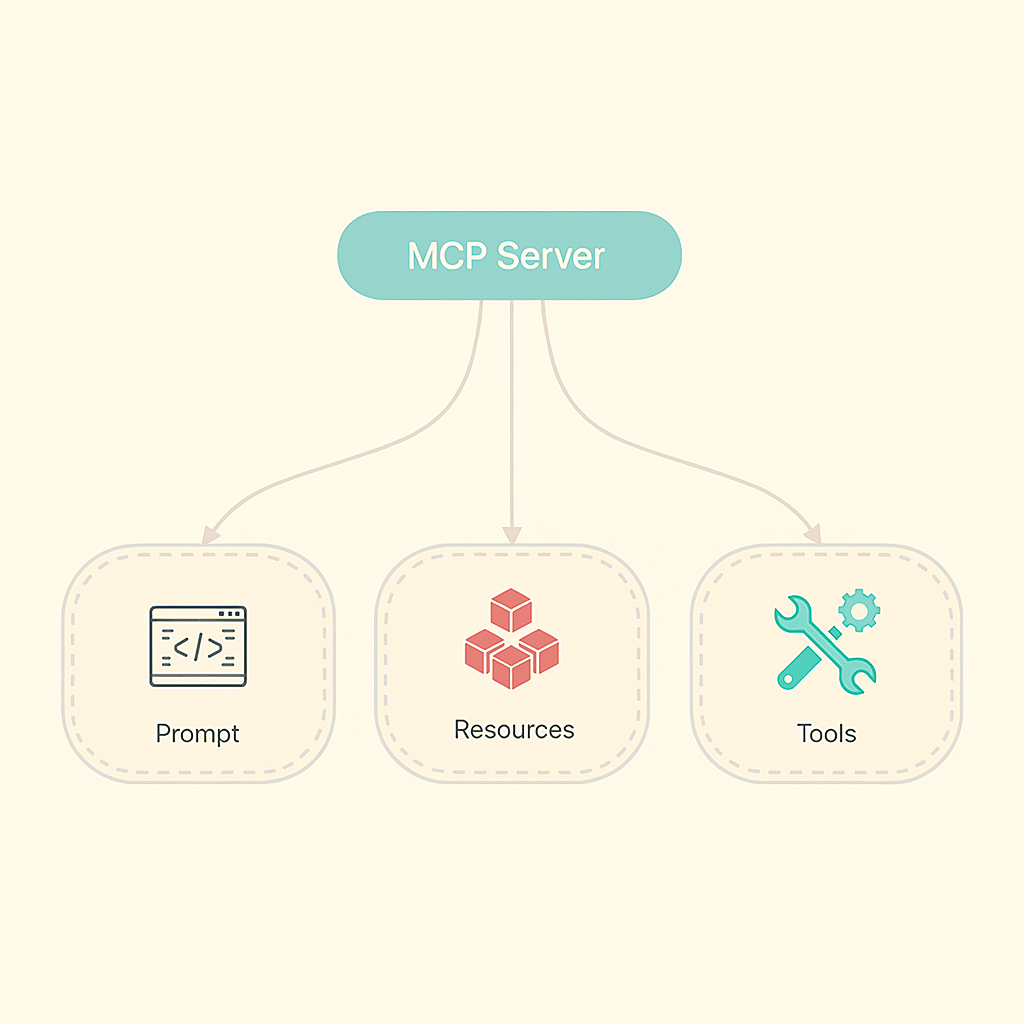 The three types of functionalities exposed by a MCP server.
1. Prompts
Prompts are templates that help structure AI interactions. Like "analyze this error log using this specific format" or "summarize this document focusing on security issues."
It is probably the least-used capability right now, but it's handy for standardizing how you ask AIs to do specific tasks.
2. Resources
Resources provide read-only access to data like configuration files, logs, or documentation. These operations have no side effects—they're purely informational. Perfect for things like "show me the current system status" or "what's in this log file."
3. Tools
Tools are the real workhorses. These are the functions that actually perform actions like writing to databases, sending emails, or modifying files. These operations have side effects and require careful permission management.
This is where things get interesting, but also require you to think about security.
Client Security: create a sandbox
Here's where Model Context Protocol gets serious about not letting your AI accidentally delete your entire database. The client acts as both the AI system's interface and your security boundary. When servers want to perform actions, they must request permission through specific mechanisms.
The most critical is the roots system, where you define what resources servers can access:
This creates a sandbox: the server can only access files within those directories. But here's the catch: this is a cooperative security model. Well-behaved servers will respect these boundaries. Malicious ones won't. So treat every MCP server like you would any third-party code.
Servers can also request sampling (asking the AI to reason about something) and elicitation (requesting additional information from you). These mechanisms enable multi-step workflows while keeping humans in the loop. Which is exactly what you want for anything that matters, at least for now.
Performance reality: how to avoid the bottleneck
There's a performance trade-off to consider: MCP's RPC-based architecture introduces latency compared to direct function calls. Each tool interaction requires serialization, network communication, and deserialization. For applications making hundreds of tool calls per second, this overhead will hurt.
We’ve seen this become a real bottleneck in high-throughput environments. If you're building something that needs to make tons of rapid tool calls, you might want to consider batching operations or keeping some critical functions as direct integrations.
The protocol's stateful nature also affects context management. Multi-step conversations with servers consume more tokens as context grows, which directly impacts your costs if you're using token-based AI systems. Keep an eye on this. Context can grow faster than you expect.
Security Implications: validation and approval
Model Context Protocol doesn't eliminate security concerns—it standardizes them. Which is both good and bad. Prompt injection remains a real threat; malicious servers could return responses containing hidden instructions that trick AI systems into performing unintended actions.
Our advice: treat every MCP server as potentially untrusted. The roots mechanism provides one layer of protection, but you need additional validation of server responses and clear approval workflows for sensitive operations. The human-in-the-loop pattern isn't just nice to have, it's your best defense against things going sideways.
Back to our appointment scheduling AI assistant
Let’s put that theory into practice with our medical practice scenario.
We have build an MCP server that exposes appointment management tools and calendar resources. The AI client connects to this server and gains access to scheduling functions.
To be able to send out the rescheduling email to patient Sarah, the AI follows a clear workflow. The AI-assistant:
- Discovers available tools (modify_appointment, cancel_appointment, etc.)
- Reads calendar resources to check availability
- Proposes the appointment change to the human receptionist
- Executes the modification after approval
- Sends a confirmation email to the patient
That human approval step is crucial. It transforms the AI from an autonomous agent into a smart assistant that will always ask permission before acting. This is the pattern best suited for most real-world applications.
Get your hands dirty: time to experiment
For local development, start with the stdio transport:
This gives you a working MCP server to experiment with. Play around with it! The best way to understand MCP is to build something simple and see how it feels.
For production deployments, you'll want HTTP+SSE transport for remote servers. Check the official documentation at https://modelcontextprotocol.io for the complete specification, and browse GitHub for "mcp-server" to see what other developers are building.
Conclusion: an inevitable shift
MCP represents an inevitable shift toward standardized AI integration. Rather than each application building custom AI features in isolation, we're moving toward ecosystems where AI capabilities can be shared and composed.
For developers, this means you have to think about Model Context Protocol compatibility early in your design process. For businesses, it means your applications can participate in the AI ecosystem rather than being bypassed by it. The companies that figure this out early will have a significant advantage.
The protocol isn't perfect, as it introduces performance overhead and requires careful security consideration. But it provides a solid foundation for building AI integrations that work across different systems without starting from scratch each time.
As AI capabilities become more central to software applications, having a standard integration protocol becomes less optional and more essential.
The integration mess isn't going to solve itself. MCP is a step toward making it manageable.
Curious about our other AI projects and insights?